- NOL Card in Dubai: An Overview
- Why Do You Need NOL Card?
- Where Can You Use the RTA NOL Card?
- Types of NOL Cards
- Step-by-Step: How to Top Up NOL Card
- Important Details - Limits, Activation & Waiting Time
- Ways to Recharge Your NOL Card in the UAE
- Online Top-Up Methods
- Offline Top-Up Methods
- How to Check Your NOL Card Balance
- Tips for Using Your NOL Card Effectively
- Common NOL Card Issues and How to Fix Them
- FAQs
How to Top-Up Your Nol Card in UAE
You can easily top up and use your NOL card in Dubai. The process is simple and can be completed both online and offline. You can also apply for an RTA NOL card if you don’t have one, using the NOL Pay app or by visiting an RTA authorised sales agent.

Best credit cards with 0 Annual fee*

Dubai
Abu Dhabi
Sharjah
Ras Al Khaimah
- Cashback up to AED 2,000
- Rewards + Welcome Offers
- No Annual Fee
- Travel benefits
- Dining Discounts
- Entertainment Benefits
Filters
Salary range
5,000 AED50,000+ AED
Bank Name
Feature Type

Most Popular Credit Card in UAE
NOL Card in Dubai: An Overview
The NOL Card is offered by the Roads and Transport Authority (RTA) in Dubai. It is available both as a physical and a virtual card. You can get an NOL card online from the NOL Pay app as a virtual card. The following list details where you can get an NOL card offline:
- Ticket offices
- Ticket vending machines
- RTA authorised sales agents
Table of Content
Why Do You Need NOL Card?
RTA NOL card is a smart card that can be used to pay for public transport services in Dubai. It can also be used for non-transport payments like fuel, groceries, and food with a cap of AED 200. You can check out the list of retail establishments that accept NOL Pay using their mobile application available on Google Play and the App Store.
Where Can You Use the RTA NOL Card?
The NOL card is accepted across almost all major public transportation modes in Dubai, as well as many retail outlets. Whether you have a physical or virtual RTA NOL card, you can use it for the following services:
Public Transport
- Dubai Metro
- Dubai Tram
- Public Buses
- Water Buses and Ferries
- Dubai Taxi vehicles that support NOL payment
- Intercity buses from Dubai to other Emirates
Non-Transport Payments
Apart from transportation, your NOL card can be used for daily purchases such as:
- Groceries
- Convenience store items
- Fuel payments at select petrol stations
- Parking meters across Dubai
- Vending machines and some cafés
You can browse the full list of retailers that accept NOL Pay using the NOL Pay mobile app.
Types of NOL Cards
RTA offers different NOL card types depending on how often and where you travel. Each card comes with unique features suited for daily commuters, tourists, and premium travellers.
Dubai’s RTA provides several NOL card options with different benefits and fare categories:
1. NOL Red Ticket
- Great for tourists and occasional users
- Supports single, return, daily, and weekly passes
2. NOL Silver Card
- Most widely used
- Convenient for everyday commuters
3. NOL Gold Card
- Allows travel in Gold Class cabins on Metro and Tram
- Offers a premium experience at a slightly higher fare
4. NOL Blue (Personalised) Card
- Registered under your name
- Can be blocked or replaced if lost
- Rechargeable up to AED 5,000
- Offers concession fares for eligible groups

Step-by-Step: How to Top Up NOL Card
Topping up your RTA NOL card is fast, easy, and available both online and offline. Choose the method that suits your convenience. Below is a complete guide to recharge your RTA NOL card.
Online Top-Up Methods
Online top-ups allow you to recharge your NOL card anytime, anywhere. These methods are ideal for regular users who prefer digital convenience.
Recharge via the RTA Website
This is the official and most direct way to recharge your RTA NOL card online.
Steps:
- Visit the RTA website
- Select Top-Up My NOL Card
- Enter your 10-digit tag ID
- Choose your amount
- Pay with a card
- Tap your NOL card at any validator to activate
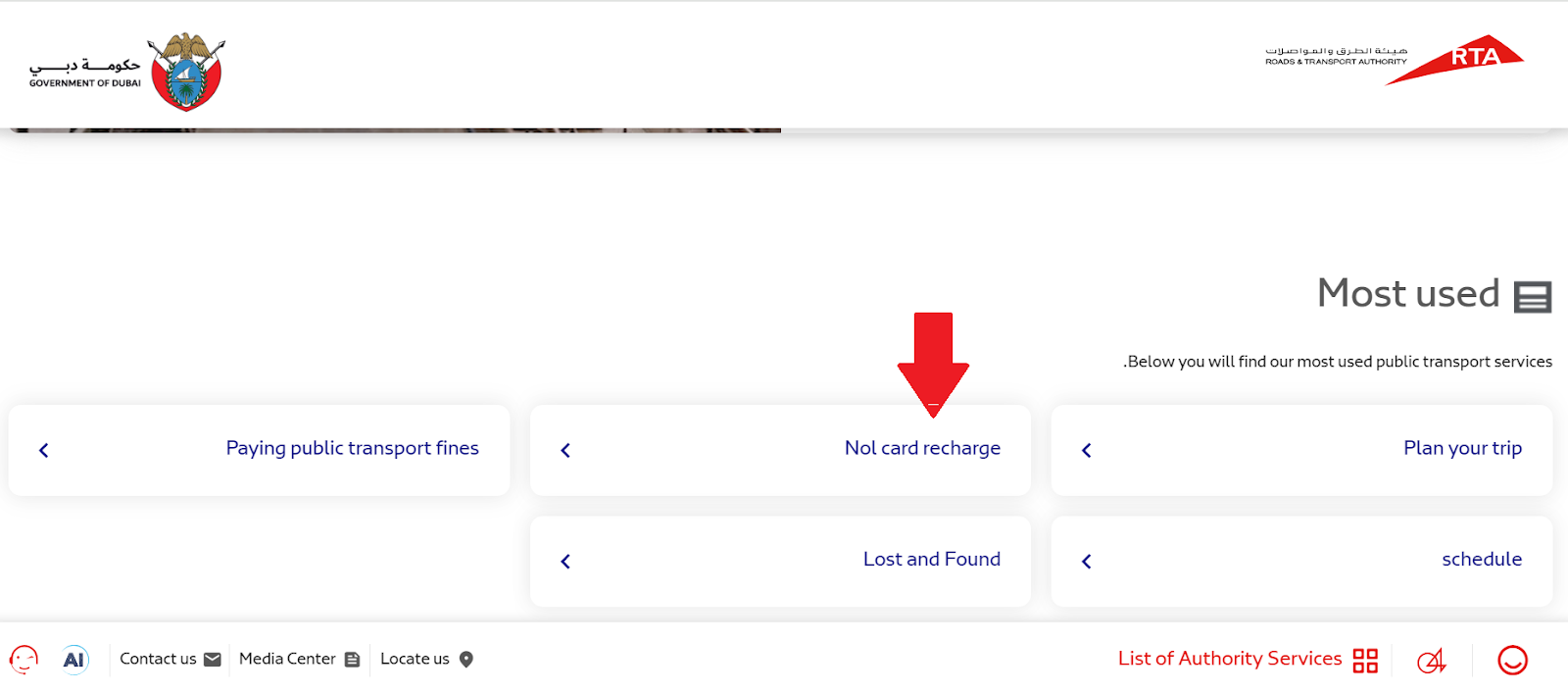
Recharge Using the RTA Dubai App
The RTA Dubai app lets you manage and recharge your NOL card digitally.
Steps:
- Download the app
- Register your NOL card
- Select the recharge option
- Enter amount & pay
Recharge Through S’hail App
S’hail offers a unified transport experience, including NOL top-ups.
Steps:
- Open S’hail
- Register your card
- Enter amount
- Pay securely
- Wait 45 minutes - 4 hours for activation
Offline Top-Up Methods
Offline top-ups are perfect for tourists and those who prefer paying in cash. These methods give you instant balance without waiting.
Dubai Metro Stations
Metro stations are the fastest offline locations to recharge. You can use:
- Ticket vending machines
- Ticket counters
RTA Solar Top-Up Machines
These machines are placed across the city for quick and easy recharges. Simply:
- Tap the credit card
- Select amount
- Pay via cash or card
Grocery Stores & Supermarkets
- These are widely available and convenient for local residents.
- To find one, search “NOL card recharge near me”.
ENOC, EPPCO & Zoom Petrol Stations
- Ideal if you’re on the go and need a quick recharge.
- Just provide your card tag ID and pay at the counter.
Important Details - Limits, Activation & Waiting Time
Understanding these details helps you avoid failed transactions, long delays, or incorrect balances after a top-up. Here’s what to keep in mind before you recharge:
Recharge Limits
Your RTA NOL card type determines how much you can load at once. Limits:
- Anonymous cards: Up to AED 1,000
- Personalised cards: Up to AED 5,000
- Retail purchases: Up to AED 200 daily
Activating Online Top-Ups
Online payments must be synced to your physical card. Activate by tapping:
- Metro gates
- Bus validators
- Parking meters
- Solar machines
Waiting Time for Balance Update
Processing time varies depending on the platform.
- RTA Website: A few minutes
- RTA App: 10 minutes - 2 hours
- S’hail: 45 minutes - 4 hours
Balance Validity
Your NOL card balance stays active for up to five years, making it ideal for both residents and occasional visitors.
Ways to Recharge Your NOL Card in the UAE
There are numerous ways to recharge your NOL Card online and offline in the UAE. As a prepaid card, recharging your NOL Card is required to use it, especially if you want to use it for shopping.
In Dubai, the maximum amount you can recharge your NOL Card is AED 1,000 for anonymous cards and AED 5,000 for personal and registered NOL Cards. The following list details all the ways you can recharge your NOL Card in the UAE.
Online Top-Up Methods
Here are ways to recharge your NOL card online. However, some online top-up methods may require you to register your NOL Card before completing the top-up. The following list details all the online top-up methods for NOL cards.
- Recharge via RTA Website:
- You can recharge your NOL Card using the RTA website.
- You just have to visit the NOL Home page on the RTA website and choose “top-up my NOL Card” to start the process.
- Using the RTA website to recharge your NOL Card may require registering your card first.
- Recharge Using the RTA Dubai App:
- You can also recharge your NOL Card using the RTA Dubai app, and the steps are similar to those on the RTA website.
- Navigate to NOL Cards on the mobile application, register your card, and recharge it with any amount you like, with a cap of AED 5,000.
- Recharge Through Third-Party Apps (e.g., S’hail):
- The S’hail app also lets you recharge your NOL Card very easily, using a similar stepwise method as the RTA Dubai App.
- However, it is required that you register your card before the top-up.
- Also, you may need to wait for 45 minutes to 4 hours for the top-up to reflect on your card.
Offline Top-Up Methods
Offline top-ups of RTA NOL cards are possible at various physical locations in Dubai. This is the most convenient top-up method for tourists and visitors.
- Top-Up at Dubai Metro Stations: Dubai metro stations are the best offline location for you to recharge your NOL Card because you can check the top-up success very easily by tapping your NOL Card on the metro gate, which is also a NOL Card activation spot.
- You can use any ticket vending machine or ticket office at Dubai metro stations to top up your NOL Card.
- All you have to do is tap your card on the dedicated spot of the machine and top up your card with the amount you want using either cash or card payments to complete the top-up.
- Using RTA Solar Top-Up Machines:
- Since the solar top-up machines are also powered by the RTA, the top-up process is the same.
- You have to tap your card on the machine, choose the top-up amount, and complete the transaction with cash, credit, or debit cards to complete the NOL Card recharge.
- Recharge at Grocery Stores and Supermarkets:
- It is possible to recharge your NOL Card from participating supermarkets and grocery stores. Simply search “NOL card recharge near me” online to find a participating store.
- Just check whether the store is authorised as an NOL top-up agent or not.
- If they are authorised, you can share your 10-digit NOL Card tag number with the cashier, who will recharge your NOL Card upon receiving the required recharge payment in cash or through a card transfer.
- Top-Up at ENOC, EPPCO, and Zoom Petrol Stations:
- You can top up your NOL Card at authorised ENOC, EPPCO, and Zoom petrol stations.
- You have to present the 10-digit tag ID of your NOL Card to the service desk at the petrol station and request a recharge for your required amount.
- The recharge will be completed post cash or card payment of the recharge amount.

How to Check Your NOL Card Balance
You can check your NOL Card balance both online and offline. The following methods are the most common ways for you to check your NOL Card balance.
(1) Check Balance on RTA Website: You can easily check your NOL Card balance on the RTA website by following these steps.
- Visit the RTA official website
- Go to the NOL Card home page and choose the ‘Check NOL Balance’ option
- Enter your 10-digit NOL Card tag ID and click Search
- Your NOL Card balance will be displayed on screen
(2) Check Balance Using RTA NOL App: You can only check your own NOL Card balance on the RTA NOL App by following these steps.
- Download the RTA NOL App
- Log in to the app and register your NOL Card
- Check the card info section on the app to find your active NOL Card balance
(3) Check Balance via SMS: If you don’t have access to the internet, you can still check your NOL Card balance using SMS by following these steps.
- SMS your 10-digit NOL Card tag ID to 511 (this registers your NOL Card to the phone number you sent the message from)
- Once registration is complete, you can message BAL or Balance to 511 to get your active NOL Card Balance.
(4) Check Balance at Metro Station Vending Machines:
- You can check your NOL Card balance very easily using the metro station ticket vending machines.
- Simply tap or insert the card into the machine, and supported machines will automatically display your NOL Card balance on the screen.
Tips for Using Your NOL Card Effectively
The NOL Cards are very handy in Dubai and have become a one-stop solution for travel and general daily payments. The following tips will help you utilise your NOL Card to the best.
- 5-year balance validity: Some NOL Cards hold your recharge balance for up to five years. This means if you’re occasionally visiting Dubai, you don’t have to get a new card every time.
- Privileged Access: The Gold NOL Card allows access to Gold Class cabins on the Dubai metro and trains. This is a special access that comes standard with your Gold NOL Card. In fact, if you’re travelling in any transport mode that doesn’t have Gold Class cabins, you will not be charged the higher fares.
Common NOL Card Issues and How to Fix Them
The physical NOL Card can have issues at times and requires efforts from your end to get it fixed. The common NOL Card issue and how to fix it are listed below.
Broken/Lost/Damaged Card: If your NOL Card is damaged or lost, you can initiate a block request for the card and get a refund for your card balance in cash or transfer it to another personalised and registered NOL Card.
FAQs
Q1: Where can I use the NOL Card for shopping?
Ans: You can use the NOL Card for shopping at over 2000 retailers in Dubai. You can find out all the approved retailers on the NOL Pay mobile application.
Q2: Can tourists get a NOL Card?
Ans: Yes, tourists in Dubai can get an NOL Card, which can be used to pay for public transport services in Dubai.
Q3: How many times can I use a NOL daily pass in Dubai?
Ans: You can use the public transport unlimited times with a NOL daily pass loaded on the NOL Red card.
More From Credit Cards
- Recent Articles
- Popular Articles
 04 Feb 2026Emirates Miles Calculator: Check How You Earn Skywards Miles?The Emirates points calculator is an automated tool for tracking your Skywards Miles. It lets you check how many miles you can earn from flights and spending with Emirates.
 22 Jan 2026Credit Card Eligibility Checker - Age, Income & Document RequiredCredit card eligibility checker is a helpful tool. It shows you the cards that you might qualify for, based on your financial details.
 09 Jan 2026DIB Roadside Assistance Credit Cards in UAE DIB Roadside Assistance Credit Cards in UAE - Choose & Apply for the best Dubai Islamic Bank (DIB) with Roadside Assistance in UAE & Dubai with features & Benefits. Check eligibility, documents required, how to Apply, & more.
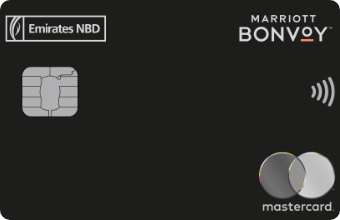 19 Feb 2026Marriott Bonvoy Credit Cards in UAE – Rewards & BenefitsExplore Marriott Bonvoy credit cards in UAE. Compare rewards, travel perks, annual fees & eligibility. Apply online for exclusive hotel benefits.
 09 Jan 2026How to Get Credit Cards with a Poor Credit Score?The following article provides in-depth information on how to figure out the right time to apply for a credit card. You will also learn things and situations to consider before applying for a credit card in uncertain times.
 05 Jan 2026How To Cancel Auto Debit for Credit Card Payments | Paisabazaar UAEThis guide will show you how to cancellation auto debit credit card payments. You'll be well-equipped to regain control over your credit card payments and take charge of your financial journey in UAE.
Compare Our Products


- Follow Us :