How to Activate HSBC Credit Card
Got a new card from HSBC? Now, the next step is to activate the HSBC credit card. The card won’t be functional unless you activate it. As ...read more

Airport Lounge
Relax Before you take off

Shopping Benefits
Exclusive offer on top Cards

Fuel benefits
Save more on every fill

Movie Discounts
Enjoy blockbusters for less


Reward points on Every Spend*


Monthly Income (Dirhams)
Below 5k
5k - 8k
8k - 12k
12k - 15k
15k - 20k
20k - 25k
25k - 35k
Above 35k

 Tanvi Pathak

How to Activate HSBC Credit Card?
Here’s how you can activate HSBC Card through mobile and phone banking —
Via Mobile Banking
- Register your account on the HSBC app.
- Sign in using your credentials.
- Go to the ‘Manage Cards’ menu.
- Click ‘Set/Reset PIN’ to set up a new 4-digit PIN.
- Confirm the PIN and submit.
Via Phone Banking
Activate HSBC credit card offline by calling +97143544579. Follow the on-call prompts and complete the process.

Best HSBC Credit Card in UAE
Free for 1st year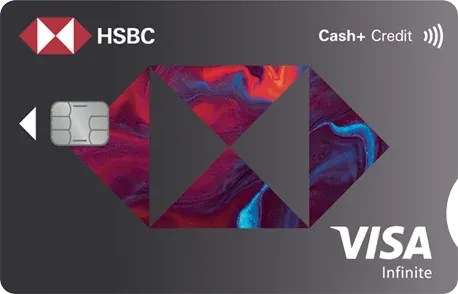
Cash+
Minimum Salary:30,000
Annual Fee:1st Year Free*
Enjoy automatic 1% daily cashback on all eligible spends.
Get up to 50% off dining bills at over 4,000 restaurants across the UAE with your complimentary Zomato Gold membership.
Welcome Bonus
Emirates Skywards Infinite Credit Card
Minimum Salary:30,000
Annual Fee:2,625
Get 50,000 Skywards Miles when you pay the joining fee of AED 2,999.
Earn 75,000 bonus Skywards Miles on USD 25,000 spend in the first 3 billing cycles, plus 25,000 Miles on USD 3,500 Emirates (EK) spend within 12 months.
Free for 1st year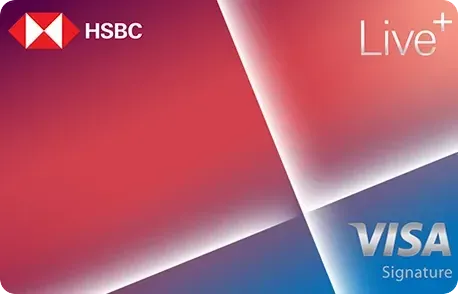
Live+ Credit Card
Minimum Salary:12,500
Annual Fee:1st Year Free*
Get up to AED 800 welcome cashback when you apply by 31 Dec 2026 .T&Cs apply.
Earn 6% on Dining, 5% on fuel and 2% on groceries and entertainment - all upto AED 200
FAQ's
Q1: How to activate HSBC credit card via internet banking?
Ans: Unfortunately, you cannot activate a new HSBC card through internet banking.
Q2: How to do credit card activation at HSBC?
Ans: Use mobile banking or phone banking for HSBC card activation.
Q3: Can I link my credit card to a digital wallet?
Ans: Yes, you can link your card to any digital wallet, such as Google Pay, Apple Pay, and Samsung Pay.
Q4: How do I activate my HSBC credit card online?
Ans: Use the HSBC mobile app to set up a new PIN for your card. Follow these steps:
- Sign in and move to ‘Manage Cards’.
- Select ‘Set/Reset PIN’.
- Create a new PIN and confirm.
More From Credit Cards
- Recent Articles
- Popular Articles
 Last Updated : 26 Oct 2026Credit Card Grace Period in UAE: How It Works & How to Avoid InterestDon't get caught by hidden credit card fees in the UAE. Discover how interest-free periods work and simple steps to completely avoid interest charges.
 Last Updated : 06 Oct 2026Debt Burden Ratio: What It Is & How to Calculate ItLearn what Debt Burden Ratio (DBR) is, how to calculate it step-by-step with formulas, and why banks use DBR to assess your loan approval limits.
 Last Updated : 15 Sep 2026Best Credit Card for Noon Supermarket in UAE 2026Best Credit Card for Noon Supermarket in UAE 2026 – Compare top cards, cashback offers, rewards and benefits to maximize savings on your Noon grocery purchases.
- Last Updated : 08 Sep 2026Best Credit Cards for Carrefour in UAE 2026Compare the top credit cards for Carrefour shopping in the UAE. Discover cards offering up to 8% back in SHARE points, cashback, and 0% installment plans.
 Last Updated : 27 Aug 2026Best Credit Cards for AED 30000 Salary in UAE (2026)Compare premium Visa Infinite & Mastercard World cards for AED 30K salary in the UAE. Maximize Skywards miles, valet parking, airport lounge access, and cash rewards.
 Last Updated : 26 Aug 2026Best Credit Cards for LuLu Hypermarkets in UAEDiscover the top credit cards for LuLu Hypermarket shoppers in the UAE. Compare top cards and high-cashback grocery options to earn up to 10% back on your daily purchases.